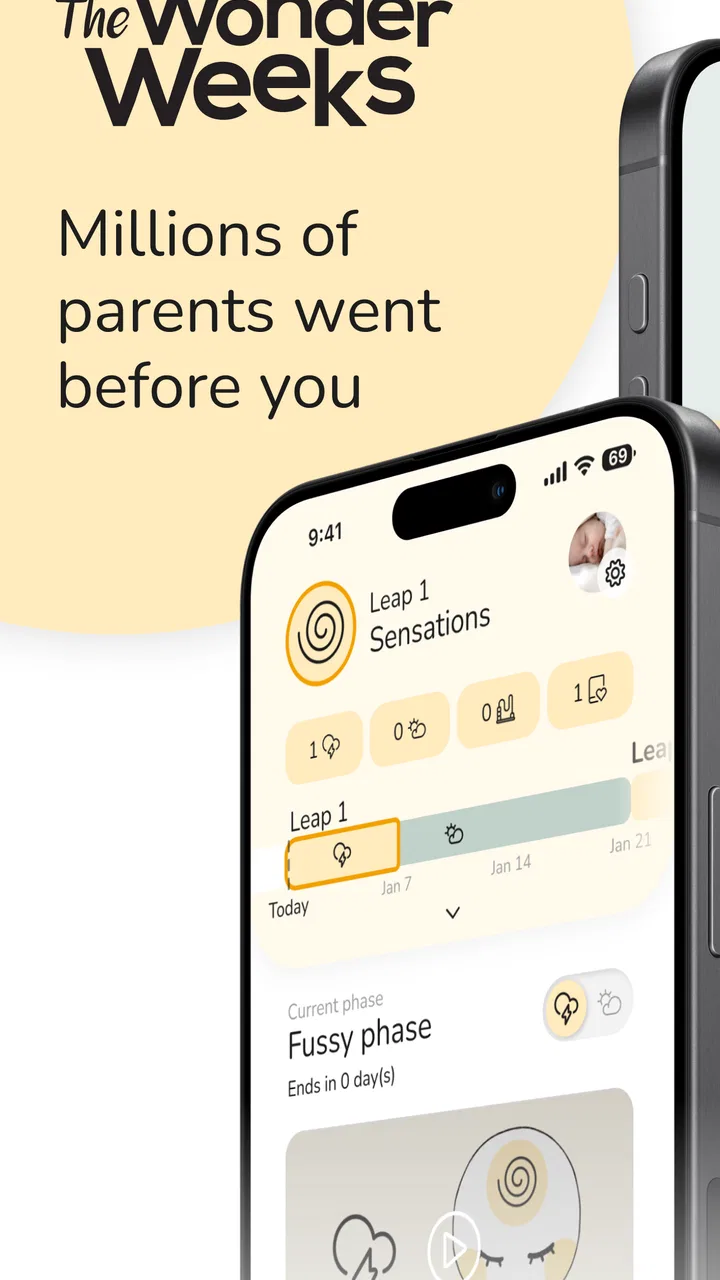
The Wonder Weeks - Baby Leaps
- 3.8
- Rating
- 500.00K
- Installs
- Free
- Price

 Analysis by App-foxy
When a baby suddenly becomes harder to settle, feeds differently, or seems unusually clingy, it is easy for everyone in the household to reach a different conclusion. One person blames sleep, another wonders about teething, and someone else searches for a developmental explanation. I found The Wonder Weeks - Baby Leaps useful as a shared conversation starter in exactly those moments. It is a parenting app from The Wonder Weeks that focuses on developmental changes and helps parents follow the idea of “leaps” during a baby’s early development.
I would not treat it as a medical tool or as a timetable that can predict every difficult day. Its real value is more practical: it gives caregivers a common framework for noticing changes, recording what is happening, and discussing the baby’s behavior with a little more patience. That makes it especially interesting in a household where two adults share care, or where grandparents and other relatives regularly help.
How the app fits into everyday family life
I find the easiest way to make a parenting app useful is to give it one small job: help me describe what has changed, rather than explain every difficult moment. When a baby’s routine shifts, I can use the app’s developmental framing to start a practical conversation with the other caregiver. From there, the next question is how to turn that context into a manageable first routine.
You May Also Like

 Blood Strike: 2.5 Anniversary
Blood Strike’s Loadouts Turn Every Drop Into a Tactical Gamble
A close look at Blood Strike’s custom loadouts: how fast access to signature weapons reshapes its battle royale rhythm, rewards preparation, and narrows the gap between fights.

 Pandora - Music & Podcasts
Pandora’s Music Is Easy to Start, but Harder to Recover
Pandora’s strength is its low-effort path from a seed to a station. Its weak spot is how much confidence it asks you to place in connection, setup, and quiet recovery.

 8 Ball Pool
 Is Built on Rivalries, Rematches, and Routine
A close look at the rivalries, rematches, shared routines, and unanswered safety questions that turn a quick pool match into a persistent mobile community.

 Samsung Music
’s Quiet Strength Is Playing What You Already Own
Its reach comes less from spectacle than from dependable access to a personal library. That simplicity is both the app’s strongest retention engine and its ceiling.

 AccuWeather: Weather Radar
AccuWeather Review: A Quick, Clear Forecast for Everyday Decisions
For everyday plans, the best forecast is the one you can understand quickly. AccuWeather makes rain timing, radar, and local conditions easy to act on, with a few trade-offs.

 Hill Climb Racing
Why Hill Climb Racing Still Turns Crashes Into One More Run
A tiny car, a bumpy hill and one more upgrade: Hill Climb Racing keeps resurfacing because its simple chaos makes every near-miss feel personal.
More From Our News Desk



A shared reference when the routine changes
Imagine a normal weekday evening. One parent has had the baby since lunch, while the other has just come home from work. The baby is tired but refuses to settle, naps have been short, and the usual routine is no longer working. Instead of handing over a vague report such as “the baby has been difficult all day,” the caregiver can use the app as a prompt to look at the current developmental period and describe the actual changes: sleep, mood, attention, or new reactions.
That does not solve the evening by itself, but it can improve the handover between adults. I like this use because it turns the app into a shared vocabulary rather than a private source of worry. A partner who was away for several hours can understand what the other person has been observing, and both can decide whether to simplify the evening instead of trying a dozen new techniques.
The app’s central idea is the baby’s sequence of developmental leaps. It is designed to help parents follow those periods and connect them with newborn milestones and changing behavior. In practice, I found the strongest benefit came from using the information as a gentle prompt: “What has changed recently?” rather than “This app says exactly what will happen today.”
For a household with one main caregiver, the same approach can help during calls or visits. A parent can show a relative what they have noticed and explain why the baby may need quieter interaction. That is more useful than expecting the relative to understand a developmental phase from a short message. Still, the app should support the family’s observations, not replace them.
What I would do during a difficult week
My preferred workflow is deliberately simple. I would open the app at a calm moment, review the current stage, and write down only the changes that matter to our household. For example, I might note that the baby is waking more often, becoming distracted during feeds, or showing interest in a new object. I would then share the useful part with the other caregiver and leave the phone aside.
This matters because parenting apps can become another task to maintain. If every nap, cry, feeding, and mood has to be logged, the tool starts competing with the baby. The Wonder Weeks works better when it helps me notice patterns without making me feel that I have failed because I did not record every detail.
A less obvious advantage is that it can encourage more precise language. “Fussy” is broad, while “settles only when the room is quiet” or “watches moving objects for longer” gives another caregiver something actionable. The app’s developmental framing can lead to those observations, but the family still has to decide what they mean in real life.
Setting expectations before more than one person uses it
Because this is a parenting app rather than a household management system, I would establish the family routine before relying on it together. Decide who checks the information, who shares observations, and where important notes will live. If each caregiver keeps separate observations only on their own phone, the app may still be helpful, but it will not automatically create a single family record.
This boundary is important for shared-device use. A tablet or phone left in a common room may be convenient, but it can also blur who is reading and changing information. I would avoid assuming that every person using the device has the same context. A tired parent might open the app during a night waking, while a grandparent might read it before an afternoon visit. A short spoken summary can prevent the same screen from being interpreted in completely different ways.
I also recommend keeping the baby’s age and birth details consistent in the household’s conversations. Developmental timing is meaningful only when caregivers understand which child the information relates to and what has actually been observed. If relatives care for more than one baby, or if the device is shared across children, a quick check before acting on a suggestion is sensible.
The app is free to install, with optional in-app purchases listed from $4.99 to $34.99 per item. That makes it easy to try without committing money immediately, but I would still look carefully at what is available before treating extra content as essential. A family should first decide whether the core approach fits its parenting style. Paying for more material will not make a developmental estimate more certain.
Coordinating parents, relatives, and caregivers
Coordination is where I think this app can earn its place. Parents often disagree not because they want different things, but because they see different parts of the day. One notices that the baby is alert and curious in the morning; another sees the crying and short naps in the evening. A leap tracker can help connect those observations, provided everyone understands that it describes a broad developmental idea rather than a strict schedule.
I would use it before a handover in three steps. First, check the current developmental period. Second, compare it with what the baby has actually been doing. Third, agree on one or two practical responses, such as reducing stimulation before sleep or allowing extra time for a feed. This keeps the app from becoming an argument about whose interpretation is correct.
For a babysitter or grandparent, I would share the practical conclusion rather than the entire theory. “The baby seems more easily distracted today, so please feed in the quieter room” is clearer than sending a long explanation about leaps. The app can help the parent reach that conclusion, but the caregiver needs a simple instruction that fits the child’s routine.
Another useful trade-off is that the app may reduce unnecessary switching between generic parenting articles. Instead of searching each time a baby behaves differently, I can begin with the developmental context and then decide whether the issue is ordinary variation, a routine problem, or something that needs professional advice. That can save time, but it should not discourage a parent from seeking medical help when symptoms are concerning.
Where the predictions need a careful reading
The biggest limitation is the temptation to read the leap calendar too literally. Babies do not follow an app with perfect precision. Sleep, feeding, temperament, illness, family changes, and simple day-to-day variation can all affect behavior. If the app suggests that a difficult period should be ending but the baby remains unsettled, that does not mean the parent has used it incorrectly.
I would also be cautious about using it to explain every behavior. A baby who cries more may be going through a developmental change, but may also be hungry, overtired, uncomfortable, or unwell. The app is best at helping me form a question, not at giving a final answer. Its timeline should guide observation, never override common sense or professional care.
This is especially important when several adults share responsibility. One caregiver may feel reassured by the leap explanation, while another may feel that something else is wrong. The right response is not to use the app to win the disagreement. Compare observations, check the baby’s basic needs, and seek qualified advice when the situation seems outside normal family uncertainty.
Age context and trust
The Wonder Weeks belongs to the parenting category and is suitable for Everyone, which fits its role as an adult-facing family tool. The age label does not mean that children should be left to interpret it. Babies obviously cannot use it independently, and older siblings may misunderstand the developmental language if they browse without an adult explaining it.
For me, trust comes from keeping the app in its proper lane. It can be trusted as a structured way to think about developmental changes, but not as a diagnosis, a guarantee of behavior, or a substitute for a pediatric professional. That distinction should be made clear when relatives use a shared phone, particularly if someone tends to treat app guidance as more authoritative than the baby’s actual condition.
I would also avoid presenting the leap schedule as a reason to dismiss a caregiver’s concern. A parent who says, “This does not feel normal,” deserves attention even if the app places the baby in a developmental phase. Digital guidance is useful only when it leaves room for judgment and individual differences.
The app has an average rating of 4.0 from around 3.1 thousand ratings, with more than one hundred written reviews, and it has passed half a million installs. Those figures suggest that many parents find the concept worthwhile, while the rating also reflects a reasonable reality: a developmental tracker will feel more helpful to some families than to others. I would read that as a reason to try it thoughtfully, not as proof that it will fit every baby.
Device sharing, privacy habits, and account boundaries
On a shared household device, I would treat the app as a family reference, not as a place to leave sensitive assumptions about a child. Keep the device protected in the same way you would protect other parenting information, and make sure each adult knows whether they are viewing the current child’s information or simply browsing general material. The app can support coordination, but it does not remove the need for clear family boundaries.
If two parents use separate phones, agree on which observations matter enough to communicate. Sending every notification or every minor mood change can create noise. A short daily message with the baby’s sleep, feeding, and most noticeable new behavior is likely to be more useful than a stream of screenshots. The app works best when it improves communication rather than becoming another source of alerts.
Families should also think about who needs access. A grandparent who visits twice a week may only need a verbal update. A co-parent who shares nights and mornings may benefit from checking the same developmental context. These are different roles, and treating them as identical can make the household routine harder instead of easier.
How it compares with ordinary parenting alternatives
The usual alternative is a general baby tracker that concentrates on feeds, diapers, sleep, and growth. That kind of app is better when the family needs a practical record of care, especially when multiple people must know when the baby last ate or slept. The Wonder Weeks takes a different route. It is more focused on developmental timing and the changes caregivers may notice around those periods.
A paper notebook can be better for families who want complete freedom and no learning curve. It allows parents to write exactly what matters and share it at the kitchen table. The trade-off is that it does not provide a structured leap framework. A general search engine offers a huge amount of information, but it can also produce conflicting advice and send a tired parent down an anxious rabbit hole.
In my view, the best pairing is often this app plus a very simple household note, rather than this app alone. Use the app for developmental context and the note for concrete care details. That division prevents the leap calendar from being overloaded with tasks it was not designed to handle, while still giving caregivers a reliable handover.
I would choose a conventional tracker first if the main problem is coordinating bottles, pumping, medication, naps, or appointments. I would choose The Wonder Weeks first if the family keeps asking why the baby seems suddenly different and wants a calmer way to observe development. Neither approach is automatically superior; they answer different parenting questions.
Practical limits before installing
The app was released on July 4, 2024, and the current version is 1621, shown as 12.2.16. It supports devices running Android 7.0 or later. Those details matter if an older family phone is being reused as a nursery or shared-care device. Before planning around it, check that the intended phone or tablet can run the current version smoothly.
The free starting point is helpful for testing the experience, but the optional purchases mean that some families may eventually face a decision about spending. I would not buy immediately because the concept is easy to understand from a short trial: if the leap-based approach makes observations clearer and reduces household confusion, it may be worth considering; if it makes everyone more anxious about dates, paying for additional material is unlikely to change that reaction.
Another limitation is emotional rather than technical. Parents who already feel overwhelmed by schedules may find another developmental timeline stressful. The app can make a hard week feel more understandable, but it can also encourage constant checking if used nervously. I would set a boundary, such as reviewing it once a day or only when a noticeable change occurs, instead of opening it after every unsettled moment.
Who will benefit most from it?
I think it is a good match for first-time parents who want a simple developmental framework, co-parents who need a shared language, and relatives who want to understand why a baby’s behavior may shift. It can also help experienced parents who enjoy observing milestones but want something more organized than scattered notes.
It is less suitable for someone seeking medical reassurance, a detailed care log, or a guaranteed sleep forecast. Parents who dislike milestone schedules may prefer a notebook or a general tracker. I would also skip it as the main tool if the household needs several caregivers to record precise care events in real time; a dedicated feeding and sleep tracker is more appropriate for that job.
The strongest use case is modest: open the app when the baby seems to be changing, compare its developmental context with real observations, and use the result to coordinate a kinder response. That is enough. It does not need to become the center of family life to be useful.
My household verdict
After looking at it as a shared parenting aid, I see The Wonder Weeks as a thoughtful companion rather than an authority. Its focus on developmental leaps gives parents a way to organize confusing changes, and that can make conversations between caregivers more concrete. The free entry point makes trying it straightforward, while the Everyone age rating and clear parenting focus suit adult family use.
My recommendation comes with one condition: keep the app subordinate to the baby in front of you. Use it to notice patterns, prepare a handover, and decide whether the household should slow down or change its routine. Do not use it to dismiss concerns, force a child into a timetable, or replace professional guidance.
For a family sharing care across a phone, a tablet, and different daily schedules, that balanced approach is where the app makes the most sense. It can help everyone start from the same developmental context, but the final decisions still belong to the caregivers who know the baby and can respond to what is happening right now. I would recommend it as a calm observation tool, not as a promise that every leap will follow the calendar.
FAQs for The Wonder Weeks - Baby Leaps
01What is The Wonder Weeks app and how does it work?
The Wonder Weeks app is designed to help parents understand and anticipate the developmental changes and leaps that their baby experiences during the first 20 months. Based on extensive research, the app provides insights into your baby's mental development stages, offering tips and guidance to support them through each leap. It works by tracking your baby's age and predicting upcoming leaps, making it a valuable tool for understanding your child's behavior.
02Is The Wonder Weeks app suitable for all babies?
While The Wonder Weeks app is based on research that applies to many babies, each child is unique. Some parents may find the app aligns perfectly with their baby’s development, while others may notice variations. It’s important to use the app as a general guideline and consider your baby’s individual pace and personality when interpreting the information provided.
03What features does The Wonder Weeks app offer?
The app includes a personalized leap calendar, detailed descriptions of each developmental leap, tips for helping your baby through these phases, and a diary feature to track your baby’s progress. It also offers a community section where you can connect with other parents for support and advice, making it a comprehensive tool for navigating early parenthood.
04Does The Wonder Weeks app require an internet connection?
The core features of The Wonder Weeks app, such as the leap calendar and descriptions, do not require an internet connection once the app is downloaded. However, for features like community interactions and updates, an internet connection is needed. This allows you to access the latest information and connect with other users seamlessly.
05How user-friendly is The Wonder Weeks app for new parents?
The Wonder Weeks app is designed with new parents in mind, offering a simple and intuitive interface. Navigation is straightforward, with easy access to key features like the leap calendar and tips. The app’s language is clear and supportive, making it an accessible tool even for those who may not be tech-savvy, ensuring a smooth experience for all users.
Pros
- Tracks baby's mental development stages.
- Offers personalized tips and advice.
- Easy-to-use interface for parents.
- Includes a handy calendar feature.
- Backed by scientific research.
Cons
- Requires payment for full access.
- Limited offline functionality.
- Some data may be overwhelming.
- Occasional app crashes reported.
- Not all features are intuitive.

The Wonder Weeks - Baby Leaps
Gallery